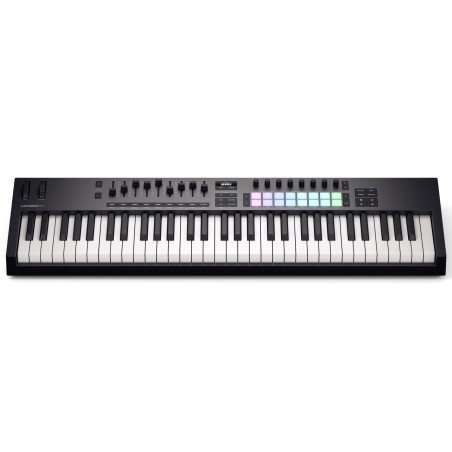
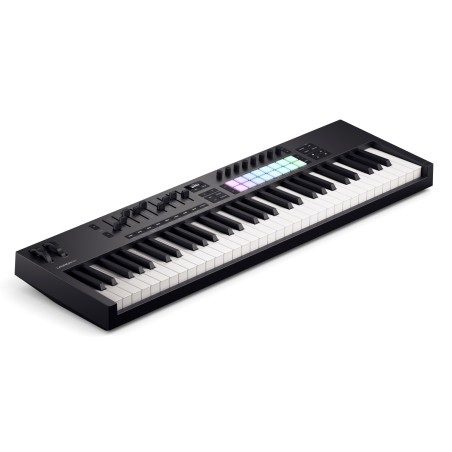
KEYBOARD MIDI-USB CONTROLLER Discover your inspiration with the Launchkey 61:
A versatile DAW controller featuring five octaves of semi-weighted keys and 16 proprietary FSR pads, perfect for finger percussion, launching clips, and more. This controller also features nine faders and eight rotary controls, ideal for mixing, controlling plugins and exploring creative tools.
Innovation and minimalist design
The new generation of the Launchkey features completely renewed hardware and a minimalist design. Offers new ways to unleash your creativity, whether with your DAW, hardware synths, or iOS devices. Chord, Scale and Arpeggio modes have been improved to ensure you always hit the right note and do so more expressively. Additionally, the new OLED display provides clear and detailed information. Advanced integration with DAWs The Launchkey is compatible with leading DAWs out of the box, offering seamless integration with Ableton Live, Logic, Cubase, Reason Studios, Reaper, FL Studio and Ardour. This ensures an intuitive workflow, allowing full control over transport functions, navigation, mixing, EQ, clip launch, and instrument and effects parameters. The 16 drum pads also double up to launch RGB-backlit clips in Ableton Live's Session views and Logic's Live Loops. Premium Keys and Pads The Launchkey 61's upgraded keyboard is responsive and durable, with 61 semi-weighted waterfall keys delivering a premium experience. The patented FSR drum pads, with polyphonic aftertouch and velocity sensitivity, feature a unique radial sensor that improves sensitivity and consistency, ensuring perfectly coordinated performance. Advanced Creative Tools The Launchkey 61 packs powerful creative tools into its hardware, working equally well in your DAW, hardware synths, or mobile devices. Scale modes allow you to lock the keyboard to one of the 30 available scales, avoiding incorrect notes and assigning everything to the white keys. Fixed Chord mode triggers entire chords with a single note, while Chord Maps lets you create amazing progressions from the pads. The improved arpeggiator makes it easy to create unique, mutable sequences.
Control of multiple instruments
The Launchkey 61 allows you to split the keyboard into two zones, allowing you to play two different instruments at the same time or group the 61 keys into two MIDI channels, sending the same notes to both.
Custom modes
The Launchkey controls are configurable using the free Components software, allowing up to four custom assignments for the faders, encoders and pads. These settings can be instantly recalled from the hardware to send notes, MIDI CC or program changes. Beyond the computer The five-pin MIDI output makes it easy to connect hardware synthesizers without the need for a DAW. With Components and custom mappings, you can control key functions directly from the keyboard. The Launchkey also supports USB and various music creation apps for iPhone and iPad, including Novation's Launchpad app. Everything you need to create The Launchkey 61 includes everything you need to start creating music, including Ableton Live 12 Lite, which allows you to record and play with up to eight MIDI or audio tracks, as well as offering a variety of instruments, effects and creative tools. Also includes a selection of additional studio-quality effects and sounds from Novation and Focusrite.
Software included:
• Ableton Live 12 Lite
• SEM by Oberheim
• OB-E by Oberheim
• M-TRON PRO I
• AXXESS by GForce
• Delicate Piano
• Flutando Strings
• Percussion FX
• Shadowy
• Paradox Texture
• Woodwind Parallax
• LUXE by Klevgrand
• R0Verb by Klevgrand
• Slammer by Klevgrand
• Melodics-specific lessons
Specifications:
• 61 keys
• OLED display.
• 16 velocity-sensitive, backlit RGB pads with proprietary FSR technology • 2 page pads pins
• Capture MIDI/Undo/Quantise/Metronome buttons
• Scale/Chord Map/Arp/Fixed Chord/Settings/Shift buttons
• Octave up/down buttons
• Play/stop/record/loop buttons
• Navigation buttons
• USB Type-C connector 6.35 mm for sustain pedal
• Kensington security slot
Power requirements:
• USB bus power
Power supply not included


.png)
.png)



 Política de segurançaWe use reputable external institutions such as SIBS, Eupago, and Cofidis for payments.
 Política de expediçãoSee our shipping policy
 Política de devoluçãoReturn policy